Internet and Cyber Security on a Yacht
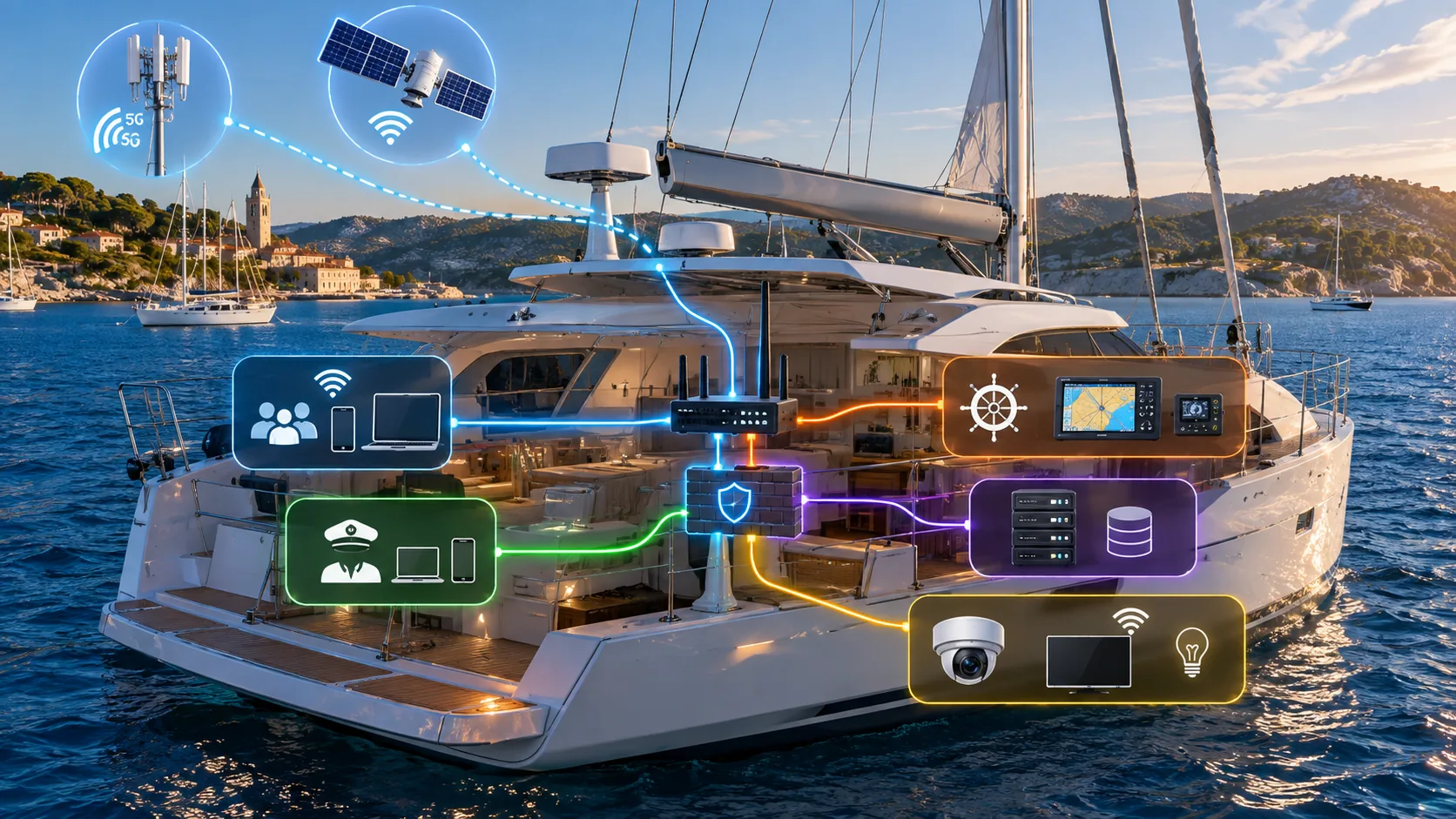
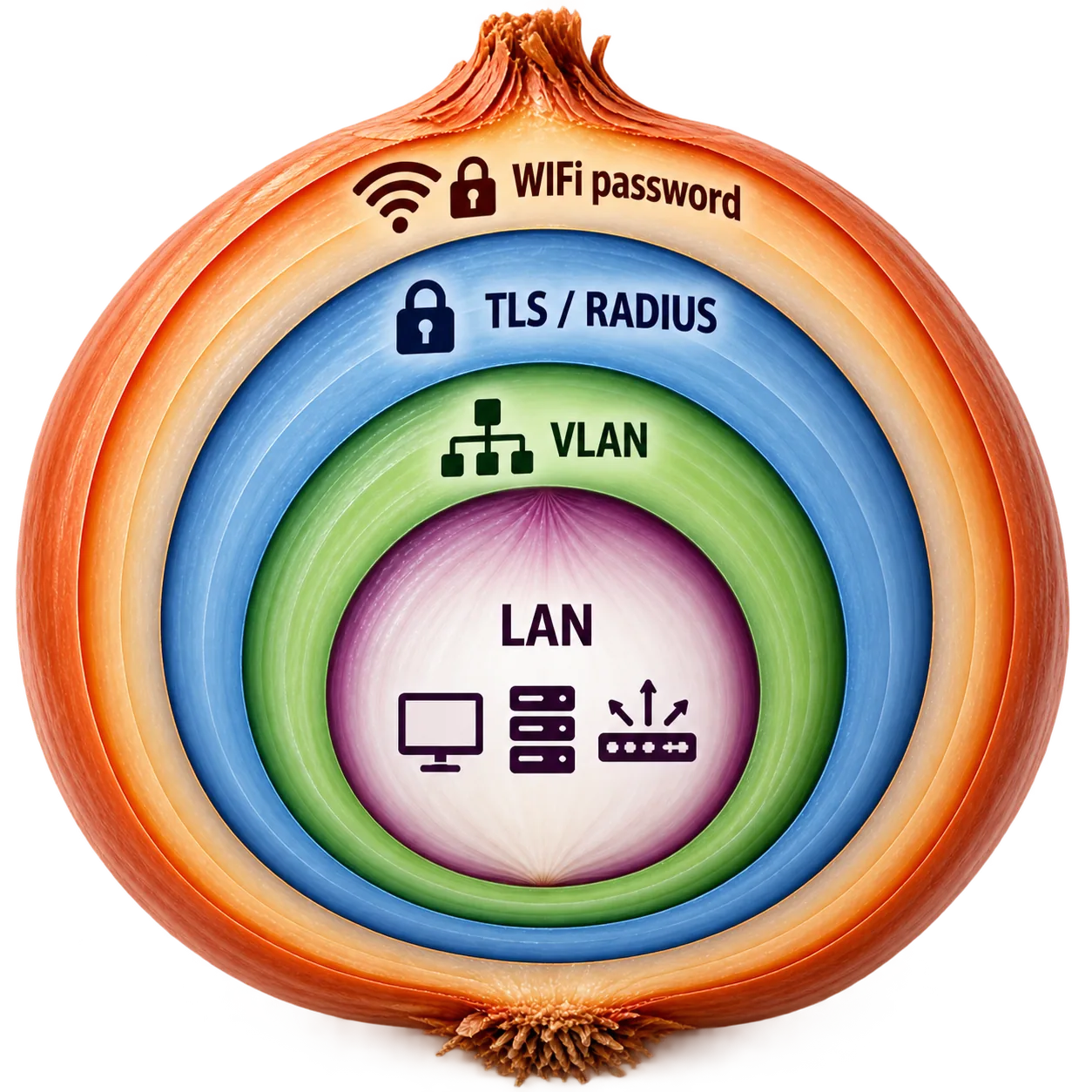
Modern yachts depend on 4G/5G, satellite internet and onboard Wi-Fi. The important security question is not only who knows the Wi-Fi password, but what that Wi-Fi network can reach once a device is connected.
A yacht may contain guest phones, crew laptops, Smart TVs, cameras, servers, chartplotters, AIS, autopilot interfaces and gateways connected to NMEA 0183 or NMEA 2000. Keeping these systems on one flat network unnecessarily increases exposure. This guide explains a practical layered design based on authentication, VLAN segmentation and firewall policy.
Wi-Fi Password Is Not Enough Protection
WPA2/WPA3, WPA2/WPA3-Enterprise, RADIUS authentication and TLS certificates can protect wireless access. Enterprise authentication can provide stronger individual access control than a single shared password, but the security of the yacht still depends on where the access point is connected and how the internal network is segmented.
A device with saved network credentials can be lost, stolen or compromised. Credentials can also be disclosed or shared. For that reason, successful Wi-Fi authentication should never automatically mean access to every onboard system.
The Problem With a Flat Yacht Network
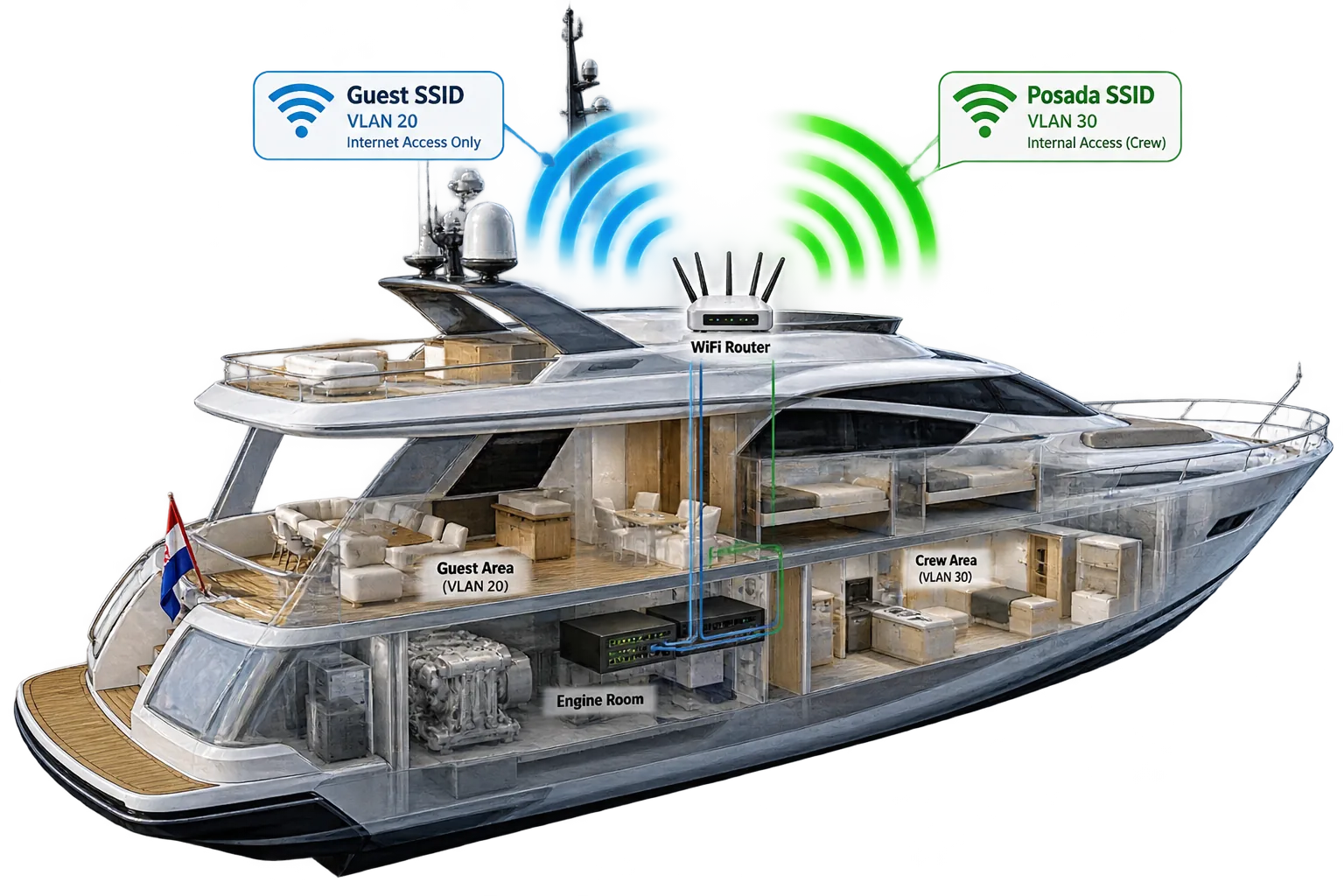
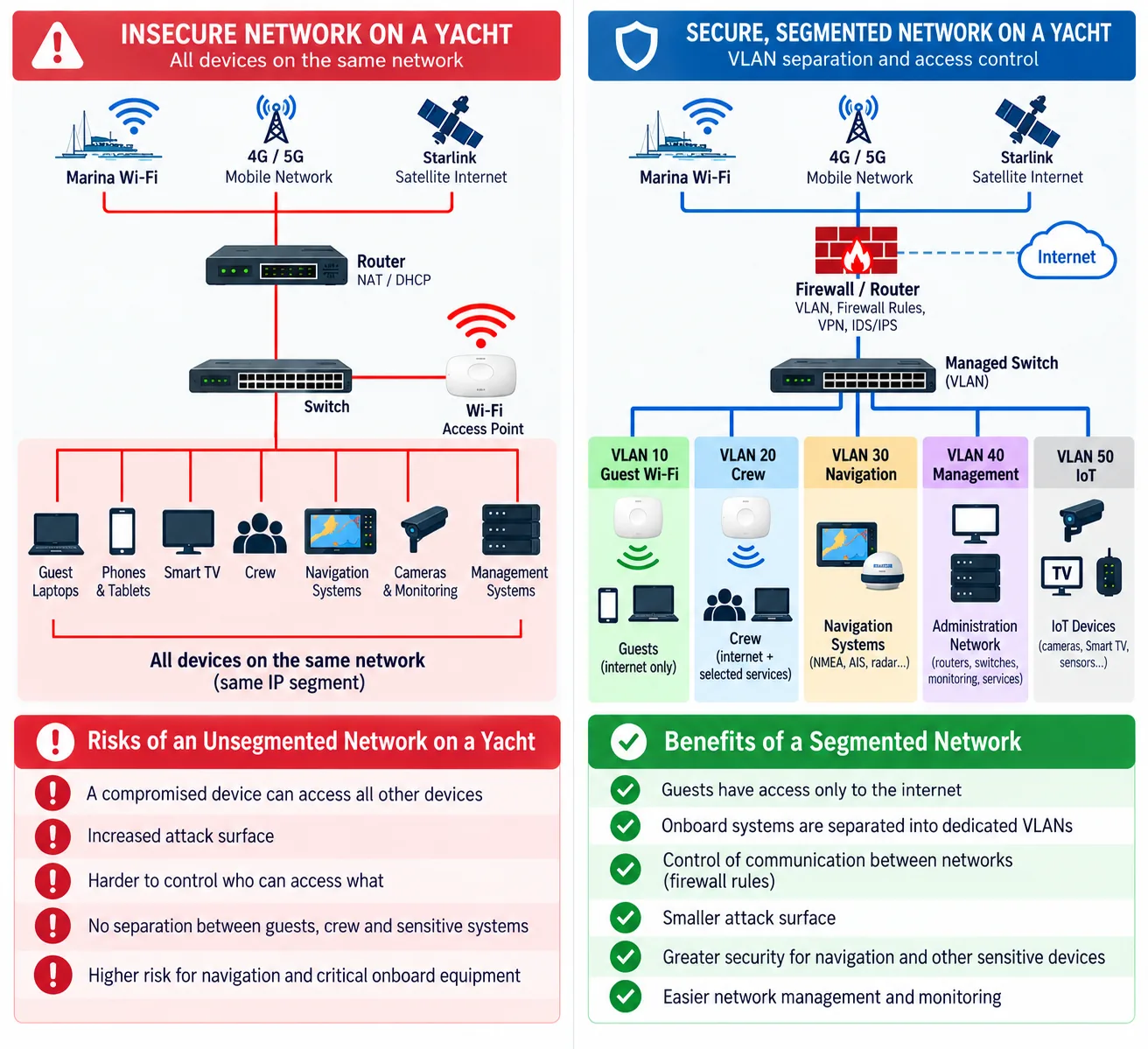
The largest problem appears when all devices share the same local IP segment. Guest phones, laptops, Smart TVs, cameras, crew computers and systems linked to navigation can then discover one another more easily. This does not automatically mean that an attacker can control the vessel, but it increases the attack surface and exposes unnecessary network services.
VLAN: Separate Networks on the Same Yacht
A VLAN (Virtual Local Area Network) divides one physical Ethernet infrastructure into several logically separated networks. A managed switch or router can keep guests, crew, navigation, servers and IoT devices in different IP segments while still using shared cabling and switching infrastructure.
| VLAN | Purpose | Typical devices | Default trust |
|---|---|---|---|
| VLAN 10 | Guest Wi-Fi | Guest phones, tablets, laptops | Internet only |
| VLAN 20 | Crew | Crew devices | Restricted |
| VLAN 30 | Navigation | Chartplotters, AIS, autopilot, gateways | Protected |
| VLAN 40 | Servers | Administration, monitoring, service systems | Highly restricted |
| VLAN 50 | IoT | Smart TV, cameras and other IoT devices | Restricted |
Guest Wi-Fi Should Have One Path
VLAN 10
No navigation access
The guest network should normally have one useful path: Guest Wi-Fi → VLAN 10 → Firewall → Internet. Direct access from guests to crew, navigation and server VLANs should be blocked.
Interactive Network Exposure Simulator
Select a network design and a device scenario. The simulator illustrates how segmentation changes the possible exposure after a device is compromised.
Yacht Network Exposure Simulator
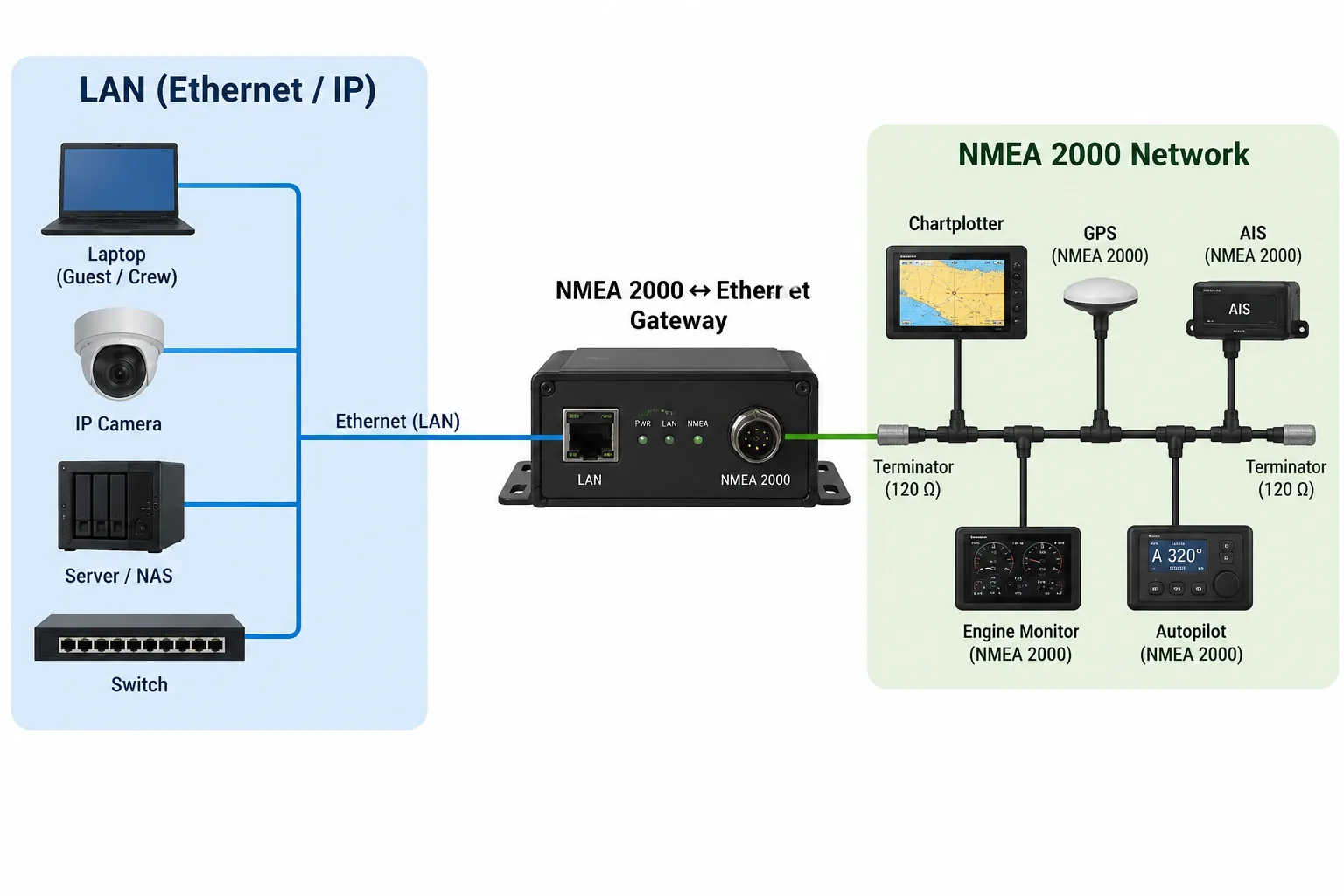
Protect Navigation and NMEA Gateways
Special attention should be given to networks that can reach chartplotters, GPS, AIS, autopilot interfaces, IP cameras, alarms, engine/generator monitoring and NMEA gateway devices.
NMEA 2000 and NMEA 0183 are not themselves Ethernet networks. The security concern appears when a gateway has an Ethernet/IP interface on one side and access to the NMEA network on the other. Such a gateway should be treated as a sensitive bridge and isolated accordingly.
The Firewall Is What Enforces the Separation
Creating VLANs alone is not enough. The router/firewall must control communication between them. A useful baseline is deny between VLANs first, then add only the specific flows that are operationally required.
| Source | Destination | Rule |
|---|---|---|
| Guest VLAN | Internet | ALLOW |
| Guest VLAN | Crew | BLOCK |
| Guest VLAN | Navigation | BLOCK |
| Crew VLAN | Internet | ALLOW |
| Crew VLAN | Navigation | ONLY REQUIRED SERVICES |
Interactive Firewall Rule Explorer
Who Should Be Able to Reach What?
Quick Yacht Cyber Security Checklist
0 / 7 controls checked
Risks of an Unsegmented Yacht Network
- A compromised device may be able to discover or reach other onboard devices.
- The overall attack surface is larger.
- It is harder to control who can access which systems.
- Guests, crew and sensitive systems are not clearly separated.
- Navigation and other operational devices face unnecessary exposure.
Benefits of a Segmented Network
- Guests can be limited to internet access.
- Marine systems can remain in dedicated VLANs.
- Firewall rules control communication between networks.
- The attack surface is reduced.
- Navigation and sensitive systems are easier to protect and monitor.
Cyber Security Is More Than Network Segmentation
VLANs and firewall rules form the network foundation, but yacht cyber security also depends on how devices are configured, updated, accessed remotely and recovered after a failure. A well-segmented network can still be compromised if an administrator account uses a weak password, a remote-access service is exposed directly to the internet, an old camera contains a known vulnerability or a service laptop introduces malware during maintenance.
For this reason, it is useful to think about yacht cyber security in layers. Each layer should reduce the consequence of failure in another layer. Wi-Fi authentication controls who joins a wireless network. VLANs control where that device is placed. Firewalls control where it can communicate. Strong credentials protect management interfaces. Updates reduce known vulnerabilities. Monitoring helps detect unusual activity. Backups and recovery procedures reduce the operational impact if a system fails or is compromised.
Remote Access: One of the Most Important Attack Surfaces
Yacht owners, charter companies and service technicians increasingly expect remote access to routers, cameras, monitoring systems, battery systems, generators and onboard computers. Remote access is convenient, but it also changes the security model because a service that was previously reachable only from the local network can become reachable from anywhere on the internet.
As a general design principle, administrative interfaces should not be exposed directly to the public internet unless there is a very specific reason and the product was designed for that exposure. A safer architecture is usually to establish an authenticated VPN or another controlled remote-access tunnel first and then reach the management interface through that protected connection.
| Remote-access method | Typical risk | Preferred approach |
|---|---|---|
| Direct port forwarding | Service is reachable from the public internet | Avoid where possible |
| VPN | VPN endpoint becomes the controlled entry point | Strong authentication + restricted routes |
| Vendor cloud access | Security also depends on vendor account and cloud service | MFA, unique account, review permissions |
| Temporary technician access | Access may remain enabled after maintenance | Time-limited account or rule, then disable |
VPN and Administrative Network
A dedicated management or administration VLAN can further reduce exposure. Router configuration, managed switches, servers, monitoring interfaces and sensitive gateways can be reachable only from this management network. Remote administrators can first connect through a VPN and then receive access only to the management systems they actually require.
This prevents a normal guest or crew device from automatically reaching infrastructure management interfaces. It also makes firewall rules easier to understand because administrative traffic has a clearly defined source.
Passwords, Accounts and Multi-Factor Authentication
Default usernames and passwords should be changed during commissioning. Every internet-facing or cloud-connected service should use a unique password. Reusing the same password for the yacht router, camera system, email account and vendor portal creates unnecessary dependency: compromise of one credential can expose several systems.
Where supported, multi-factor authentication (MFA) should be enabled for cloud dashboards, remote-access services, email accounts and administrative systems. Individual accounts are preferable to one shared administrator account because access can be removed for one person without changing credentials for everyone.
Firmware, Software Updates and End-of-Life Equipment
Marine electronics often remain installed for many years. The navigation hardware itself may continue to work perfectly while the operating system, embedded web server, Wi-Fi chipset or network service becomes outdated. Cyber security therefore requires an inventory of network-connected equipment and a basic update policy.
Routers, access points, managed switches, cameras, NAS devices, onboard PCs, monitoring gateways and remote-access appliances should be checked periodically for firmware or security updates. Equipment that no longer receives security updates deserves additional isolation and should not be unnecessarily reachable from guest networks or the public internet.
Disable Services You Do Not Use
Every enabled service creates another possible entry point. If a device provides Telnet, FTP, an old HTTP administration interface, UPnP, remote shell access or a vendor service that is not required, disabling it reduces the attack surface. The same principle applies to router features such as automatic port forwarding.
During commissioning, document which services are intentionally enabled. This makes future troubleshooting easier and helps distinguish required functionality from services that were simply left enabled by default.
IoT Devices, Smart TVs and Cameras
Consumer devices are common on modern yachts: televisions, streaming devices, speakers, cameras, environmental sensors and smart appliances. These devices may communicate with external cloud services and are often maintained differently from professional marine electronics.
They should normally be placed in an IoT VLAN rather than on the navigation or administration network. If an IoT device only requires internet access, there is little reason for it to initiate connections toward chartplotters, NMEA gateways or infrastructure management interfaces.
Service Laptops, USB Media and Maintenance Access
Not every cyber-security risk arrives through the yacht's internet connection. Service technicians may connect laptops directly to Ethernet ports, use USB media, connect diagnostic equipment or temporarily enable wireless access. Maintenance procedures should therefore be part of the security design.
A useful approach is to provide a dedicated service network or controlled switch port. Temporary access can be enabled when maintenance begins and removed afterwards. Configuration changes should be documented, especially when firewall rules, VPN accounts or remote-support tools are temporarily enabled.
DNS, Internet Filtering and Malicious Destinations
Network segmentation controls communication inside the yacht, while DNS and internet filtering can add another layer for devices communicating outside the vessel. Depending on the router or security gateway, known malicious destinations may be blocked and different policies can be applied to guest, crew or IoT networks.
Filtering should be considered an additional control rather than a replacement for endpoint security, updates and segmentation.
Network Monitoring and Logging
A network is easier to protect when the operator knows what normally belongs on it. The router, firewall and managed switches can provide useful information about connected clients, assigned IP addresses, failed login attempts and traffic between network zones.
For larger yachts or professionally managed fleets, centralized logging can help identify repeated authentication failures, unexpected connections from a guest VLAN toward protected systems, new devices appearing on a navigation network or unusual outbound traffic from an IoT device.
Security Layer Explorer
Configuration Backups and Recovery
Cyber security also includes availability. A yacht may be operationally affected not only by an attacker but also by accidental configuration changes, failed updates or hardware replacement. Backups of router, firewall, managed-switch and server configurations can significantly reduce recovery time.
Backups should not exist only on the device being backed up. Keep a protected offline or external copy of important configuration, certificates and documentation. Sensitive backup files may contain credentials or private keys, so access to them should also be controlled.
Certificates and Private Keys
TLS certificates can be used for HTTPS management interfaces, VPNs, enterprise Wi-Fi and device authentication. The certificate itself is normally public information; the associated private key is the sensitive component and must be protected.
Private keys should not be copied between unrelated devices without a deliberate reason. When a device is replaced, sold or removed from service, associated credentials and certificates should be reviewed and revoked or replaced where appropriate.
Physical Security Still Matters
A network can be carefully segmented and still be weakened if an unauthorized person can reach an exposed Ethernet port, reset a router to factory defaults or remove storage containing configuration and credentials. Network cabinets, server spaces and critical equipment should therefore have an appropriate level of physical access control.
Charter Yachts Need Additional Separation
Charter yachts have a particularly dynamic trust environment. Guests change frequently, personal devices are unknown, and different technicians may service the vessel during the season. Guest credentials should therefore be easy to rotate, while the guest network itself should remain structurally separated from operational systems regardless of who knows the password.
When practical, guest access can use client isolation so that guest devices cannot freely communicate with one another. Crew and administrative credentials should never be distributed simply because a guest needs internet access.
What Happens If a Device Is Compromised?
The objective of a secure architecture is not to assume that every device will remain trustworthy forever. Instead, the network should limit what happens after one device is compromised. A compromised guest laptop should not create a direct path to navigation. A compromised camera should not provide unrestricted access to servers. A stolen crew phone should not contain permanent administrator credentials for every system onboard.
This approach is often described as limiting lateral movement: even after an attacker or malware gains access to one device or one network zone, additional controls restrict movement toward more sensitive systems.
Basic Incident Response on a Yacht
If suspicious network activity is detected, the first priority is to preserve safe vessel operation. Do not disconnect or reboot critical navigation or control equipment blindly while maneuvering or in a situation where it is required for safe navigation.
- Identify the suspicious device or network segment.
- If operationally safe, isolate that device from Wi-Fi or Ethernet.
- Preserve router/firewall logs and note the time of the event.
- Change affected credentials from a trusted device.
- Review remote-access accounts and active sessions.
- Check whether firewall or router configuration has changed.
- Update or rebuild compromised non-critical devices before reconnecting them.
- Restore known-good configuration where necessary.
Example Layered Yacht Network Architecture
| Zone | Examples | Internet | Other internal access |
|---|---|---|---|
| Guest VLAN | Guest phones and laptops | Yes | Blocked by default |
| Crew VLAN | Crew phones and operational PCs | Yes | Only required services |
| IoT VLAN | TVs, cameras, smart devices | As required | Blocked from navigation/admin |
| Navigation VLAN | Chartplotters, AIS interfaces, gateways | Only if required | Strictly controlled |
| Management VLAN | Router, switches, server administration | As required | Administrators/VPN only |
| Service VLAN | Technician laptop/diagnostics | As required | Temporary explicit access |
Cyber Security Checklist Before the Season
- Change default credentials on network-connected equipment.
- Review guest, crew, IoT, navigation and management VLANs.
- Verify that guest devices cannot reach navigation or management interfaces.
- Remove obsolete port-forwarding and temporary service rules.
- Review VPN and remote-access accounts.
- Enable MFA on supported cloud and remote services.
- Install current firmware on routers, access points, cameras and servers.
- Check whether old devices are still supported by their manufacturers.
- Back up router, firewall and switch configurations.
- Document critical IP addresses, VLAN IDs and required firewall rules.
- Review certificates, keys and credentials stored on service devices.
- Test recovery of internet and internal network connectivity before guests arrive.
FAQ
Is WPA3 enough to secure a yacht network?
No single Wi-Fi authentication method replaces internal network segmentation. WPA2/WPA3 protects wireless access, while VLANs and firewall rules control what an authenticated device can reach.
Should guests have access to the same network as the chartplotter?
Normally no. Guest access should be isolated and limited to the internet unless a specific service has been deliberately designed and secured for guest use.
Why is an NMEA gateway security-sensitive?
Because a gateway can connect an Ethernet/IP network to marine data networks. Its interfaces and allowed traffic therefore need deliberate isolation.
Are VLANs enough without a firewall?
No. VLANs create logical separation, while firewall or router policy determines which communication between those networks is permitted.
Conclusion
A strong Wi-Fi password is only the beginning of yacht cyber security. A safer architecture separates guests, crew, navigation, servers and IoT devices, then uses firewall rules to allow only necessary communication. The most sensitive interfaces—especially gateways that connect IP infrastructure with navigation or NMEA systems—should receive additional isolation and scrutiny.
Continue reading
Build your Croatia sailing knowledge with related TwoBoat guides, software, guides and planning tools.